
A practical reference for operations and supply chain teams evaluating, implementing, or improving warehouse management software
A warehouse management system (WMS) is the operational layer between your physical inventory and your business systems. It tracks every unit from the receiving dock to the outbound carrier in real time, directing the tasks your team performs and keeping your ERP accurate without manual reconciliation. This article explains what a WMS does, how its core capabilities work in practice, how it integrates with mid-market ERP platforms, and what separates platforms that scale from those that create new bottlenecks. If your team is managing inventory on spreadsheets, paper pick tickets, or manual ERP transactions, this is where to start.
Table of Contents
What Is a Warehouse Management System?
A warehouse management system is software designed to manage and optimize the physical movement of inventory through a warehouse or distribution center. It handles what happens between the moment a shipment arrives at your dock and the moment a package leaves on a carrier, directing the tasks your team performs at every step and keeping a real-time record of where every unit is and what is happening to it.
That definition covers a wide range. The simplest WMS is a bin location system that assigns storage spots and generates pick tickets. The most advanced platforms support mobile-directed workflows, automated cartonization, multi-carrier rate optimization, freight and parcel audit, and live ERP synchronization across hundreds of warehouse events per hour.
Most mid-market operations teams come to a WMS from one of three pain points:
- Inventory accuracy: the ERP shows stock that is not physically there, or items that cannot be located on the floor
- Fulfillment throughput: order volumes have grown to where manual pick, pack, and ship creates delays or errors that affect customer experience
- Cost control: shipping spend is rising without clear visibility into why, and carrier invoices are not being audited against quoted rates
|
KEY DEFINITION A WMS manages inventory movement through a warehouse in real time. It directs receiving, putaway, picking, packing, shipping, and cycle counting, and integrates with your ERP to keep inventory records accurate without manual reconciliation. |
Core WMS Capabilities Explained
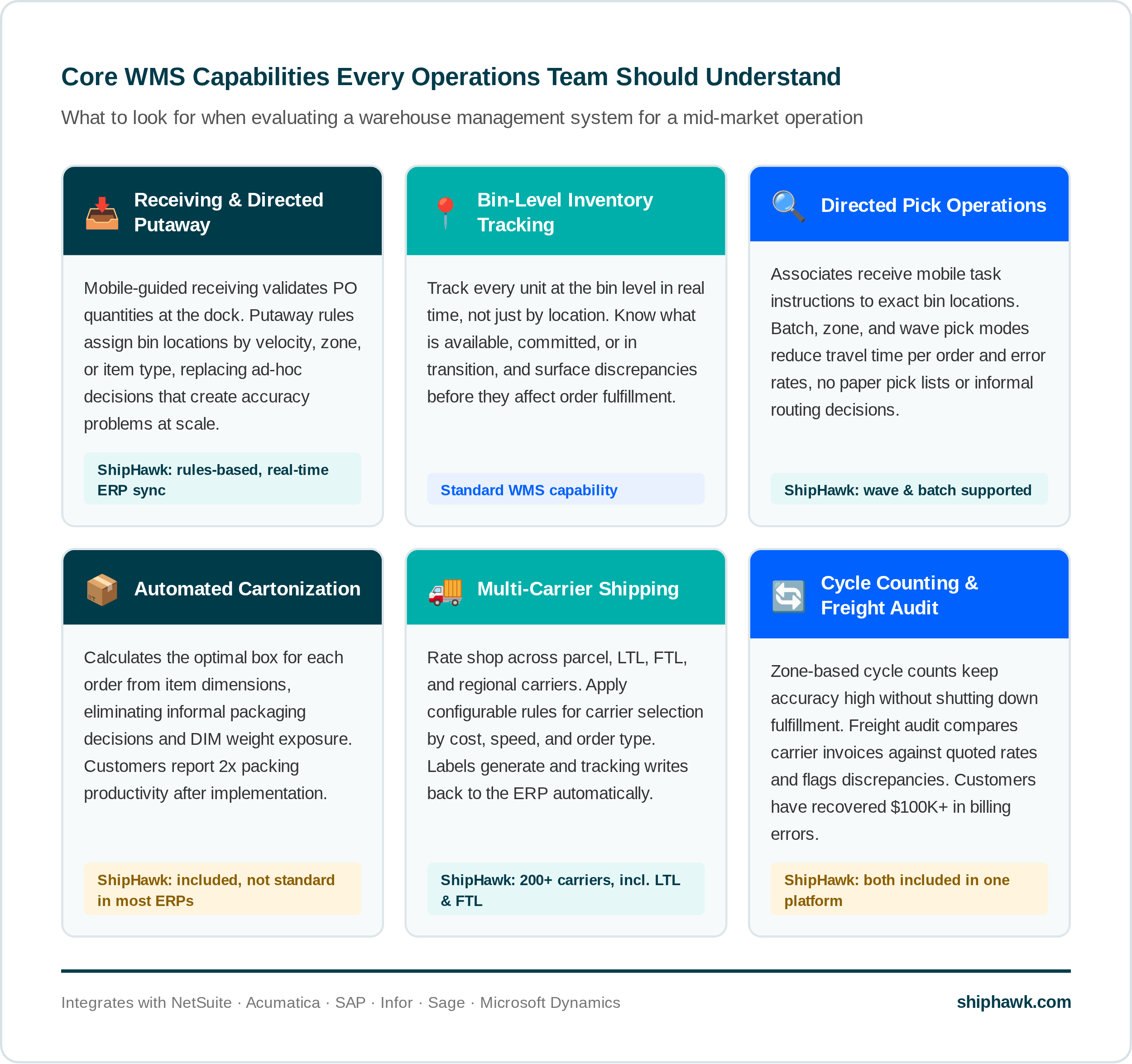
WMS platforms vary considerably in depth, but the following capability areas define what a mid-market operations team should be evaluating. Each one represents a stage in the warehouse workflow where a WMS replaces manual judgment with directed, system-driven process.
Receiving and Directed Putaway
When inventory arrives, a WMS guides the receiving team through verification against the purchase order, scanning of items or pallets, and assignment to specific bin locations. Directed putaway applies rules to determine where each item goes, based on velocity, item type, weight, zone designation, or storage requirements. This replaces the informal decisions that create inconsistency and inventory accuracy problems over time.
Without directed putaway, associates decide where to place inventory based on habit or available space. Over time this produces a warehouse where nobody is entirely sure where things are, and cycle count discrepancies accumulate.
Bin-Level Inventory Tracking
An ERP tracks inventory at the location level. It knows you have 200 units at Warehouse A. A WMS tracks inventory at the bin level. It knows you have 142 units in Zone A, Bin 12C, and 58 units in Zone B, Bin 4A, and 3 of those are committed to an open order.
This distinction matters for picking accuracy, cycle counting, and fulfillment speed. A team that knows exactly where an item is wastes no time searching and makes fewer errors than one working from a general location.
Pick Operations
Picking is the process of locating and retrieving items from storage to fulfill orders. A WMS improves pick operations through:
- Directed picking: associates receive task instructions on a mobile device specifying the exact bin, quantity, and sequence rather than reading a static list
- Batch picking: one associate collects items for multiple orders in a single warehouse pass, reducing travel time per order
- Zone picking: associates work specific zones and pass orders between zones, keeping each person in their area of the warehouse
- Wave picking: orders are grouped into batches based on carrier cutoff, shipping priority, or fulfillment deadline, ensuring the right orders move first
The measurable outcome is fewer steps per order, lower pick error rates, and more orders completed per labor hour.
Pack Station Support and Cartonization
At the pack station, a WMS validates that the correct items are being placed into the correct shipment through scan verification. This catches errors that slipped through picking before a label is applied and a box is sealed.
More advanced platforms include automated cartonization, which calculates the optimal box or combination of boxes for each order based on item dimensions and weight. Cartonization eliminates the informal packaging decisions that lead to oversized boxes, excess dimensional (DIM) weight charges, and inconsistent presentation. Customers implementing automated cartonization have reported 2x improvement in packing productivity.
Carrier Selection and Shipping
A WMS typically integrates with carrier systems to generate shipping labels, capture tracking numbers, and pass shipment data back to the ERP. The depth of this integration varies significantly between platforms. Some handle parcel only. Others connect to a full carrier portfolio including LTL and FTL freight, apply configurable shipping rules, and write all carrier and cost data back to the ERP automatically.
For operations with multiple carriers, negotiated rates, or mixed parcel and freight shipping, this is one of the highest-leverage areas in the fulfillment workflow. Automated carrier selection based on cost, speed, destination type, and shipment weight removes the manual judgment calls that default to a single carrier out of habit.
Cycle Counting
Physical inventory counts shut down fulfillment operations and still leave gaps. Cycle counting, the WMS-supported alternative, divides the warehouse into zones and counts a rotating subset of locations on an ongoing schedule. The WMS tracks discrepancies, triggers recounts for anomalies, and writes validated adjustments back to the ERP. This keeps inventory accuracy high without disrupting the fulfillment operation.
Returns Processing
Returns require the same directed workflow discipline as receiving and putaway. A WMS routes returned items through inspection, grading, and restocking or disposition decisions. Without a structured returns process, returned inventory accumulates in staging areas and disappears from both the physical warehouse and the ERP record.
How a WMS Connects to Your ERP
A WMS and an ERP are complementary systems. They are not competing for the same function. Your ERP manages financial records, orders, and high-level inventory balances. Your WMS manages the physical execution of warehouse operations in real time. The integration between them is what keeps both accurate.
Mid-market companies typically run one of several ERP platforms, and the quality of a WMS integration varies meaningfully between vendors:
|
ERP Platform |
Integration Considerations |
|---|---|
|
NetSuite |
Native integration should cover Item Fulfillments, Item Receipts, Sales Orders, and inventory adjustments. Confirm whether it writes back in real time or in batch. |
|
Acumatica |
Look for pre-built connectors that handle shipment confirmations and inventory transactions without custom scripting. Acumatica's API layer supports deep integration when the WMS vendor has invested in it. |
|
SAP (Business One / S/4HANA) |
SAP environments vary considerably. Confirm which SAP version the WMS supports and how inventory transactions are written back, particularly for multi-entity or multi-site deployments. |
|
Infor |
Infor implementations often have significant customization. A WMS integration needs to account for the specific Infor instance and any non-standard field mappings in place. |
|
Sage (Sage 100 / Sage X3) |
Sage integrations vary by product line. Clarify which Sage version is supported and whether the connector handles both inbound receipts and outbound fulfillments bidirectionally. |
|
Microsoft Dynamics (BC / F&O) |
Dynamics environments benefit from WMS integrations that use the standard API layer rather than direct database connections, which break on upgrades. |
Regardless of ERP, the questions to ask any WMS vendor are the same: Which records does the integration read and write? How frequently does it sync? Does it require custom scripting to maintain? And what happens to data integrity when the ERP is updated or the WMS is upgraded?
ShipHawk offers pre-built integrations for NetSuite, Acumatica, SAP, Infor, Sage, and Microsoft Dynamics. The integrations connect at the order, fulfillment, receipt, and inventory record level and write data back in real time, not in batch, so ERP records reflect warehouse reality without manual reconciliation.
The Operational Gap a WMS Closes
The most useful way to understand what a WMS does is to look at what happens without one. Most companies that come to a WMS evaluation are not starting from nothing. They have an ERP, often a well-configured one. They have warehouse staff who know the operation. They have been shipping orders successfully for years.
The gap a WMS closes is not the absence of process. It is the reliance on informal knowledge, manual judgment, and paper records to execute a process that has outgrown those inputs.
|
Without a WMS |
With a WMS |
|---|---|
|
Pick tickets are printed lists; associates decide their own route |
Pick tasks are directed in sequence; route is optimized by the system |
|
Bin locations are informal or based on associate memory |
Every item has a defined bin location tracked in real time |
|
Box selection is made at the pack station based on judgment |
Cartonization recommends the optimal box based on item dimensions |
|
Carrier is selected manually, often defaulting to one relationship |
Shipping rules evaluate the full carrier portfolio and select by cost and speed |
|
Inventory counts happen annually and disrupt operations |
Cycle counts run continuously by zone without stopping fulfillment |
|
ERP inventory is updated after the fact through manual transactions |
ERP reflects every warehouse event in real time through automatic writeback |
|
Carrier invoices are paid without audit |
Invoice amounts are compared against quoted rates; discrepancies are flagged |
The pattern across all of these gaps is the same: informal process works at low volume and low complexity. It does not scale. A WMS replaces informal with directed, manual with automated, and periodic with real time.
What to Look for When Evaluating a WMS
Most WMS vendors describe the same set of capabilities. The differences that matter in practice are in integration depth, configurability, implementation approach, and the quality of the shipping layer. Here is what to pressure-test in any evaluation.
ERP Integration Depth
Ask exactly which records the integration reads and writes, how frequently it syncs, and whether it requires custom scripting to set up or maintain. A WMS that only syncs orders and ignores receipts, inventory adjustments, or bin transfers leaves gaps that require manual reconciliation. The integration should be bidirectional and real time.
Configurability Without Developer Involvement
Warehouse operations change. Shipping rules need to be updated. Putaway logic needs to account for seasonal inventory. Pick sequences need to adjust as the warehouse layout evolves. A WMS that requires a developer or a vendor support ticket every time a rule changes is a WMS that will fall behind your operation. Look for platforms where operations managers can configure rules directly.
Mobile Scanning Support
Paper-based picking and manual data entry are the primary sources of warehouse error. A WMS that supports mobile scanning on standard Android or iOS handheld devices, rather than requiring proprietary hardware, reduces the cost of the hardware layer and makes it easier to scale the team.
Carrier and Freight Coverage
If your WMS handles warehouse operations but hands off to a disconnected shipping tool, you are managing a data gap at the most cost-sensitive stage of the process. Look for platforms where carrier selection, rate shopping, label generation, and tracking writeback are part of the same workflow as picking and packing. Confirm whether LTL and FTL freight are supported natively, not just through a third integration.
Freight and Parcel Audit
Carrier invoices routinely include charges that were not in the quoted rate: residential delivery fees, address correction surcharges, dimensional weight adjustments, fuel surcharge increases. A WMS that does not audit invoices against quoted rates leaves money on the table. Ask whether freight audit is built in or requires a separate vendor.
Implementation Timeline and Go-Live Support
Long implementation timelines are one of the most common WMS failure modes. Ask for a realistic go-live timeline with milestones and request references from companies of comparable size and ERP environment. Ask what support looks like in the first 90 days after go-live, when the highest volume of configuration questions and edge cases surface.
Common WMS Implementation Mistakes
A WMS implementation that goes wrong usually goes wrong for process reasons, not technical ones. The following mistakes are common enough to be worth naming before a project begins.
Skipping Item Data Cleanup
A WMS makes decisions based on item data: dimensions, weight, storage classifications, hazmat flags. If those fields are missing or inaccurate in your ERP, the errors carry directly into WMS logic and affect pick routing, cartonization, and carrier selection. Audit item records before go-live, not after.
Under-Investing in Bin Structure Design
The bin layout configured at implementation shapes how the warehouse operates for years. A layout that does not account for item velocity, product family grouping, or fulfillment patterns creates inefficiency that compounds with every order. This is the highest-leverage design decision in any WMS implementation and deserves dedicated attention before any software is configured.
Automating an Unclear Process
A WMS amplifies whatever process it runs on. Teams that implement WMS software before documenting and cleaning up their current workflow end up automating inconsistency rather than eliminating it. Map the current pick, pack, and ship process in detail, identify where decisions are informal or inconsistent, and standardize those inputs before configuring the system.
Training Only on the Happy Path
Most WMS training covers the standard workflow: receive, put away, pick, pack, ship. The edge cases, a short pick, a damaged item at receiving, a missing bin label, a returned item with no RMA, generate the highest volume of questions in the first weeks after go-live. Train the team on exception handling before they encounter it in production.
Treating Go-Live as the Finish Line
Go-live is the beginning of the operating phase, not the end of the implementation. The first 60 to 90 days surface configuration issues, data gaps, and workflow adjustments that were not visible in testing. Budget time and support resources for a structured post-launch period with clear escalation paths.
How ShipHawk Approaches WMS for Mid-Market Operations
ShipHawk is a shipping and fulfillment automation platform built for mid-market companies. It combines warehouse management, carrier automation, and freight and parcel audit in a single platform.
The design principle behind ShipHawk is that warehouse operations and shipping operations should not be managed in separate systems. The handoff between picking and carrier selection is where errors accumulate and costs go unmonitored. ShipHawk closes that gap by running the full workflow, from directed receiving to freight audit, inside one platform that writes back to the ERP in real time.
At the Receiving and Putaway Stage
|
HOW SHIPHAWK HELPS ShipHawk guides receiving associates through mobile-directed workflows tied to purchase orders in the ERP. Putaway rules assign bin locations based on item type, velocity, or storage zone. Every receipt writes back to the ERP automatically, without a manual transaction. |
At the Pick and Pack Stage
|
HOW SHIPHAWK HELPS ShipHawk supports directed picking, batch picking, zone picking, and wave management through mobile devices. At the pack station, cartonization calculates the optimal box based on item dimensions from the ERP, eliminating informal packaging decisions and DIM weight exposure. Customers have reported 2x improvement in packing productivity after implementing automated cartonization. |
At the Shipping Stage
|
HOW SHIPHAWK HELPS ShipHawk connects to 200+ carriers including parcel, LTL, FTL, and regional services, and applies configurable shipping rules to select the best carrier and service level for each order. Rules can account for order value, destination type, delivery speed, customer requirements, and carrier surcharges. Labels are generated within ShipHawk and tracking data writes back to the ERP automatically. Customers have reduced shipping costs by up to 50% and processed orders up to 93% faster compared to manual workflows. |
Freight Audit and Invoice Recovery
|
HOW SHIPHAWK HELPS After shipments are delivered, ShipHawk compares carrier invoices against quoted rates and flags billing discrepancies for review. Customers have recovered more than $100,000 in carrier billing errors through this process. Audit data feeds back into carrier selection logic so future shipments account for historical surcharge patterns. |
Key WMS Metrics and What They Tell You
A WMS generates operational data that most teams are not tracking before implementation. The following metrics are the primary indicators of warehouse performance across the pick, pack, and ship workflow.
|
Metric |
What It Measures |
Why It Matters |
|---|---|---|
|
Inventory accuracy rate |
On-hand counts in system vs. physical count |
The foundation of everything else; all downstream decisions depend on accurate records |
|
Pick accuracy rate |
Correct picks as a percentage of total picks |
Errors here become returns, re-ships, and customer service costs downstream |
|
Order cycle time |
Order receipt to label generation |
Reflects combined efficiency of the full pick, pack, and ship sequence |
|
Lines picked per labor hour |
Individual and team picking throughput |
Benchmarks efficiency and identifies training or layout improvement opportunities |
|
Receiving throughput |
Units received and put away per hour |
Slow receiving creates inbound backlogs that delay available-to-sell inventory |
|
Cycle count variance rate |
Discrepancy rate during scheduled counts |
Leading indicator of putaway, receiving, or picking process gaps |
|
Cost per shipment |
Total shipping spend divided by shipments sent |
Benchmarks carrier performance and identifies rate optimization opportunity |
|
DIM weight variance |
Difference between actual weight and billed DIM weight |
Signals oversized packaging and avoidable carrier surcharges |
|
Carrier invoice accuracy |
Invoiced amounts vs. quoted rates |
Quantifies recovery potential from carrier billing disputes |
|
On-time delivery rate |
Shipments delivered by promised date |
Downstream indicator of fulfillment quality and carrier reliability |
The Bottom Line on Warehouse Management Systems
A WMS is not a luxury for companies that have "made it." It is the operational infrastructure that makes scaling possible without adding proportional headcount, error rates, or shipping costs. The gap between what your ERP tracks and what your warehouse floor actually does is where fulfillment problems live. A well-integrated WMS closes that gap, directs your team's work, and gives every part of the business an accurate picture of inventory in real time. For mid-market operations teams, that is not a nice-to-have. It is the foundation everything else is built on.
|
See how ShipHawk connects warehouse operations, carrier automation, and ERP integration in one platform.
|
Explore More from ShipHawk
-
Transportation Management System (TMS): What It Is, How It Works and What To Look For
-
Freight & Parcel Audit: How ShipHawk Recovers Carrier Overbilling
-
Shipping for NetSuite: Automate Freight Directly from Your ERP
By ShipHawk
ShipHawk has a team of subject matter experts (SMEs) that specialize in warehouse operations, fulfillment strategy and shipping optimization. They partner with customers to evaluate the current state of their operation, identify opportunities for improvement, design a proposed solution, then work with the customer to deliver the improvements that drive real, measurable results.