
Reviewing data on shipping and fulfillment performance to drive business decisions is an essential part of improving your business. From knowing total order counts to examining warehouse operations, it’s important to understand where your strengths and weaknesses lie—and there’s no easier way to do that than through ShipHawk’s Advanced Analytics.
Our Advanced Analytics offers insights into your carrier and shipment trends, performances, and progress. While standard reports and KPIs display overall shipping, orders, and performance rates, this feature in ShipHawk’s Transportation Management System (TMS) delves deeper into the data by enabling you to customize specialized filters such as warehouse, carrier, time period, user, or shipping modes. You can also export raw data with ease for further analysis.
These in depth prebuilt dashboards allow you to examine all of your shipment operations, carrier performance, and warehouse operations with ease. Backed with carrier-specific metrics, you’ll be capable of making enhanced data-driven decisions to strengthen your fulfillment operations. Plus, you can create custom dashboards tailored to your specific business needs, giving you the flexibility to monitor and improve exactly what matters most to your specific operation.
Advanced Analytics Dashboards
With ShipHawk’s Advanced Analytics, you’ll get a General Dashboard, Carriers Dashboard, Shipments Dashboard, a Snapshot Dashboard, and the ability to create and customize your own dashboards. While you examine specific areas of data through these display boards, the data will also refresh frequently throughout the day so you can stay on top of operations. Additionally, you can download the data in multiple formats, including PDF or CSV, for your convenience.
Each dashboard contains tiles so you can view the data in particular areas of interest. You’ll be able to hone in on a specific area by adjusting the filters at the top of the menu so you can view the most relevant data. For the main dashboards, such as General, Carriers, and Shipments, the following filters are listed as Carrier Name, Date, Warehouse, Shipment Type, Domestic or International, and User.
With the listed filters above, the General Dashboard includes the following tiles for you to better understand your shipping progress on a holistic level: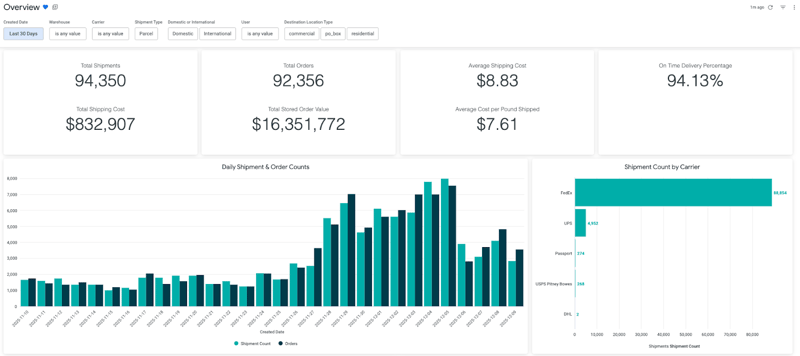
- Shipments
- Orders
- Average Shipping Cost per Shipment
- Delivery Promise
- Daily Shipment and Order Counts
- Shipment Count by Carrier
- Shipments Processed by User
- Shipments per Hour (ET)
To examine the list of carriers your business utilizes, the Carriers Dashboard tiles include:
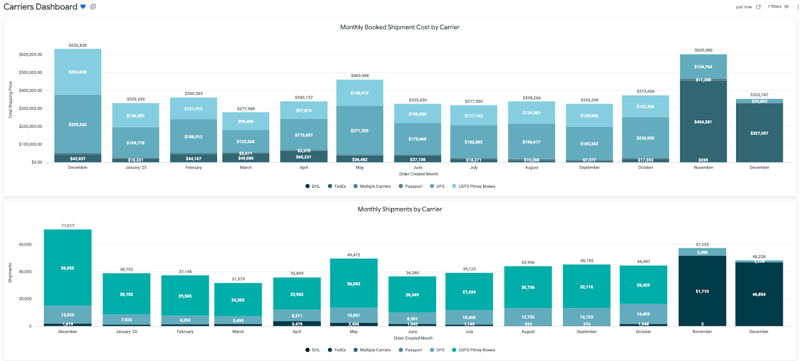
- Monthly Booked Shipment Cost by Carrier
- Monthly Shipments by Carrier
- Overall Carrier Usage Percentage
- Average Shipment Spend by Carrier
- On Time Delivery Percentage by Carrier
- Domestic Shipments by Carrier and Destination State
- Shipment Count and Booked Shipment Costs by Carrier and Service
The Shipments Dashboard, which details shipment trends, includes the following tiles:
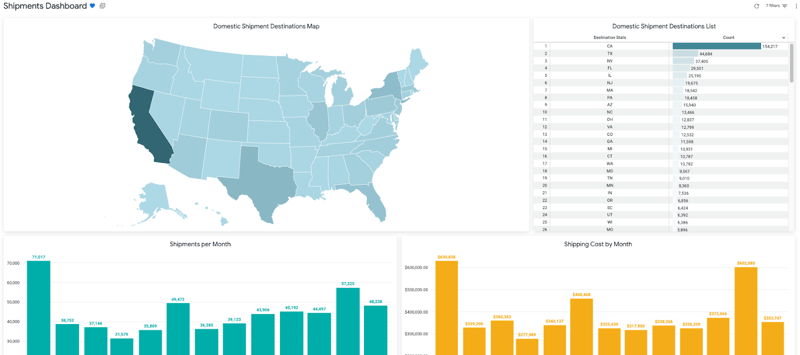
- Domestic Shipment Destinations Map
- Domestic Shipment Destinations List
- Shipments per Month
- Shipping Cost by Month
- Shipments by Warehouse
- Most Common Packages Used
- Items Shipped per Month
- Average Number of Items per Shipment
- Average Domestic Shipment Weight by State
- Shipment Counts by Origin Warehouse, Carrier, and Destination State
- Shipment by Status
- Shipment Details
With filters for Created Week, City, Parcel or Freight, Warehouse, and Destination Location Type, the Snapshot Dashboard includes the following tiles for the most current information:
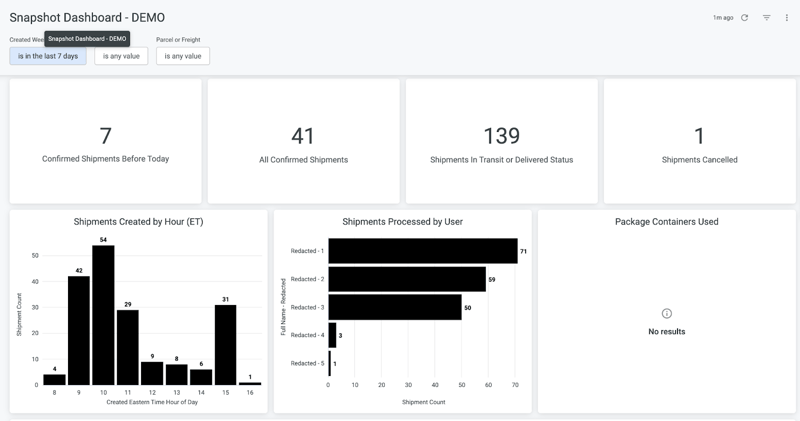
- Ordered or Confirmed Shipments Created Before Today
- Shipments in Ordered or Confirmed Status
- Shipments in Transit or Delivered Status
- Shipments Cancelled
- Shipments Created by Hour (ET)
- Shipments Processed by User
- Package Container Used
- Shipment Details
With an array of specially tailored dashboards, you’ll have access to a plethora of intricate data that will allow you to examine your shipping and warehouse progress at a higher level. To take it a step further, creating your own dashboard opens new pathways to explore and examine data from a new perspective.
Customizing Your Dashboard
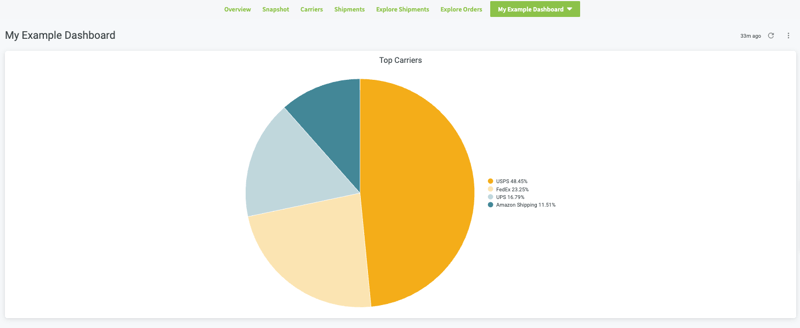
Included within the Custom Dashboard functionality, you can explore shipment and order data by defining your own set of filters and visualizations; from navigation panels that offer shipments-based data fields to hazmat data or shipments and warehouses, you can configure a variety of display charts and color-code them to your liking.
In terms of Shipments data fields, you’ll have access to all data sources when creating a dashboard. The fields are organized by functional areas, from Addresses to Workstations. Some fields are aggregations, such as Shipment Count or Total Cost Sum. Likewise, all of the Orders data fields are available to use, as the fields are organized by functional areas like Addresses and Warehouses. Some fields are aggregations, such as Average Order Price or Total Items Price as well. With over a thousand ways of shaping your dashboard, you can browse through the default dashboards to generate more ideas for more custom displays.
Lastly, once you’ve completed your custom dashboard, you have the option to save the dashboard so that you may refer to it at any time. It’s an excellent way to familiarize yourself with Advanced Analytics, allowing you to note the areas you’re excelling in.
Advance Your Fulfillment Data With ShipHawk
With ShipHawk, you’ll receive efficient decision-making with ShipHawk Standard Reporting, which includes metrics like warehouse management, shipment cost trends, and on-time delivery impact. All of these reports are accessible through ShipHawk WMS and TMS subscriptions, and they can also be summarized to set contacts via email. Some of the featured metrics include:
- Warehouse throughput
- On-time delivery
- Orders, units, and lines picked
- Lines moved (moves, puts, and replenishments)
- Cycle count reporting
- Shipment cost trends
- Processing errors and exceptions
With ShipHawk’s Advanced Analytics, you’ll access in-depth fulfillment data without an in-house Business Intelligence team. With labor getting more expensive and the increasing demand for visibility growing bigger, businesses need fulfillment metrics to understand how they can propel themselves forward. As a part of the Advanced Analytics package, you’ll be capable of diving further into fulfillment data and analytics to customize and filter dashboards according to warehouse, carrier, time, and more. With Advanced Analytics, you can export data with ease, focus on specific carrier metrics, and discover snapshot glances of all of your fulfillment operations.
If you’re interested in learning more about ShipHawk’s Advanced Analytics dashboards, talk to us today!